Every euro at the counter, accounted for.

Clefo is management software for independent car rental agencies. Contracts, inspections, planning and maintenance — built around the one thing most tools forget: the cash.

Read-only demo with sample data. Opens in your browser. No sign-up.

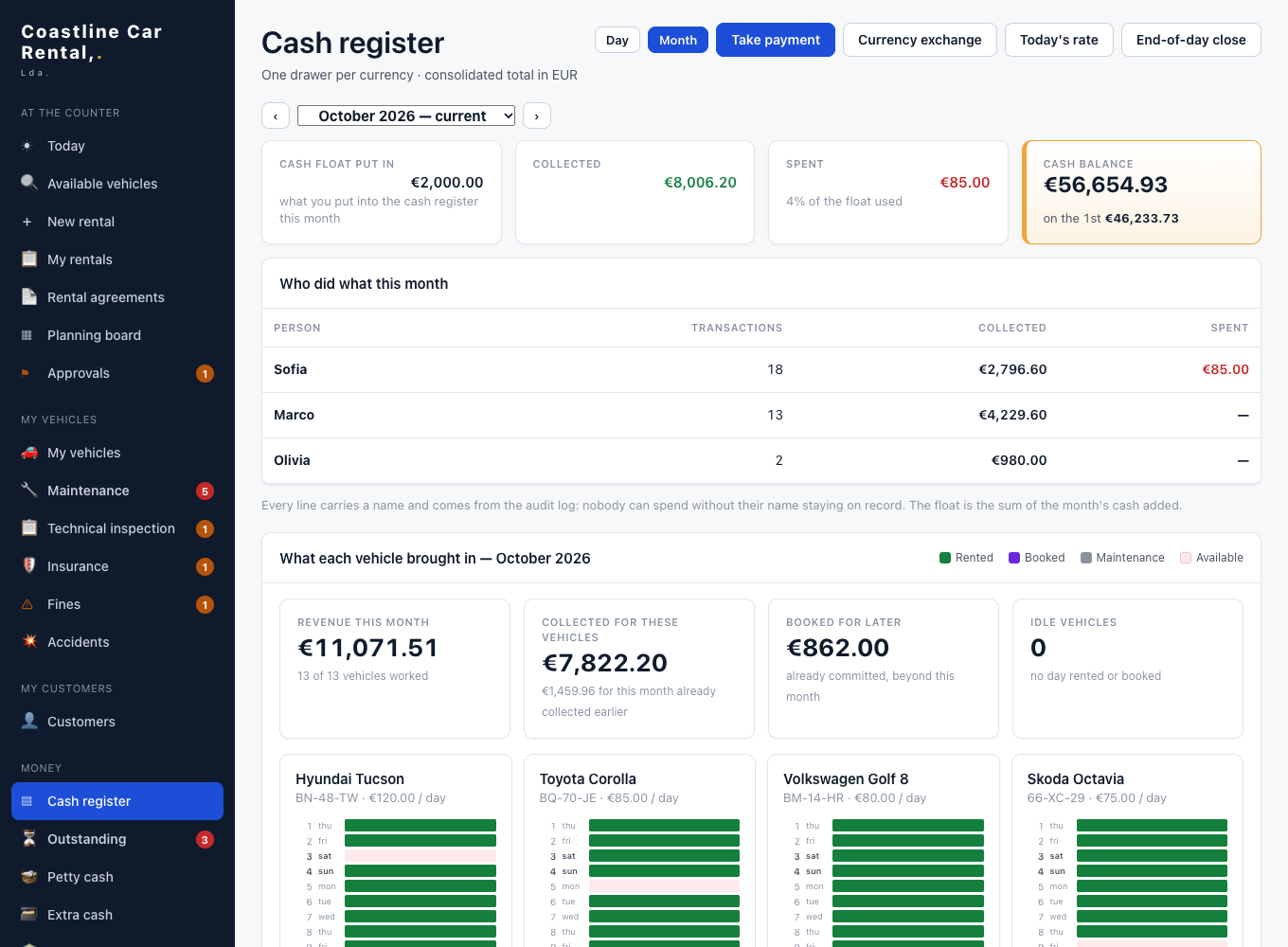
Clefo cash register, month view, with sample data

Where small agencies really lose money

You don't lose money on the bookings you see. You lose it on the ones nobody follows up.

  • A deposit counted as revenue, then handed back.
  • An advance payment counted in the wrong month — or twice.
  • A fuel or late-return charge nobody added.
  • A customer who still owes half the rental, and everyone forgot.
  • A contract changed after the fact, and no one knows by whom.
  • A drawer that's short at closing, and no explanation.

Most rental software is built to sell cars online. Clefo is built to keep the counter honest.

How it works

  1. Find a free car.

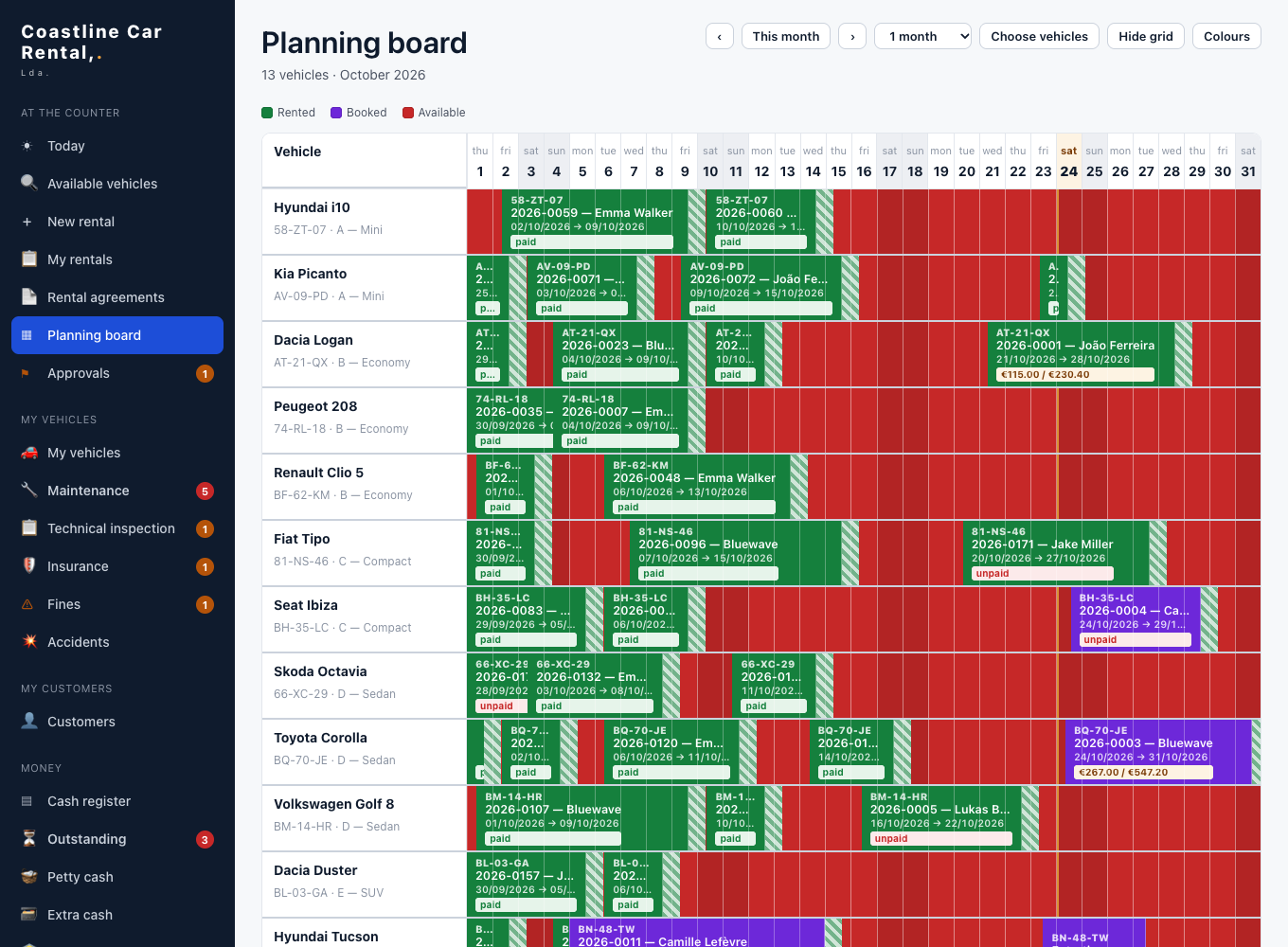
    Search by dates; the planning board shows what's rented, reserved, free or in maintenance, with a preparation buffer between rentals.

  2. Create the rental.

    The wizard fills the customer file, checks age, licence and blacklist, applies the season or negotiated price, and sets up instalments if needed.

  3. Hand over the car.

    Print the contract, take the deposit, mark existing damage on the diagram with photos.

  4. Take it back.

    Check-in inspection; late hours, fuel, kilometres and cleaning are calculated for you. Return or keep the deposit with a receipt.

  5. Close the day.

    Count the drawer. Any difference is explained in writing. The owner sees it from anywhere.

Features

Cash register

Know where every euro is.

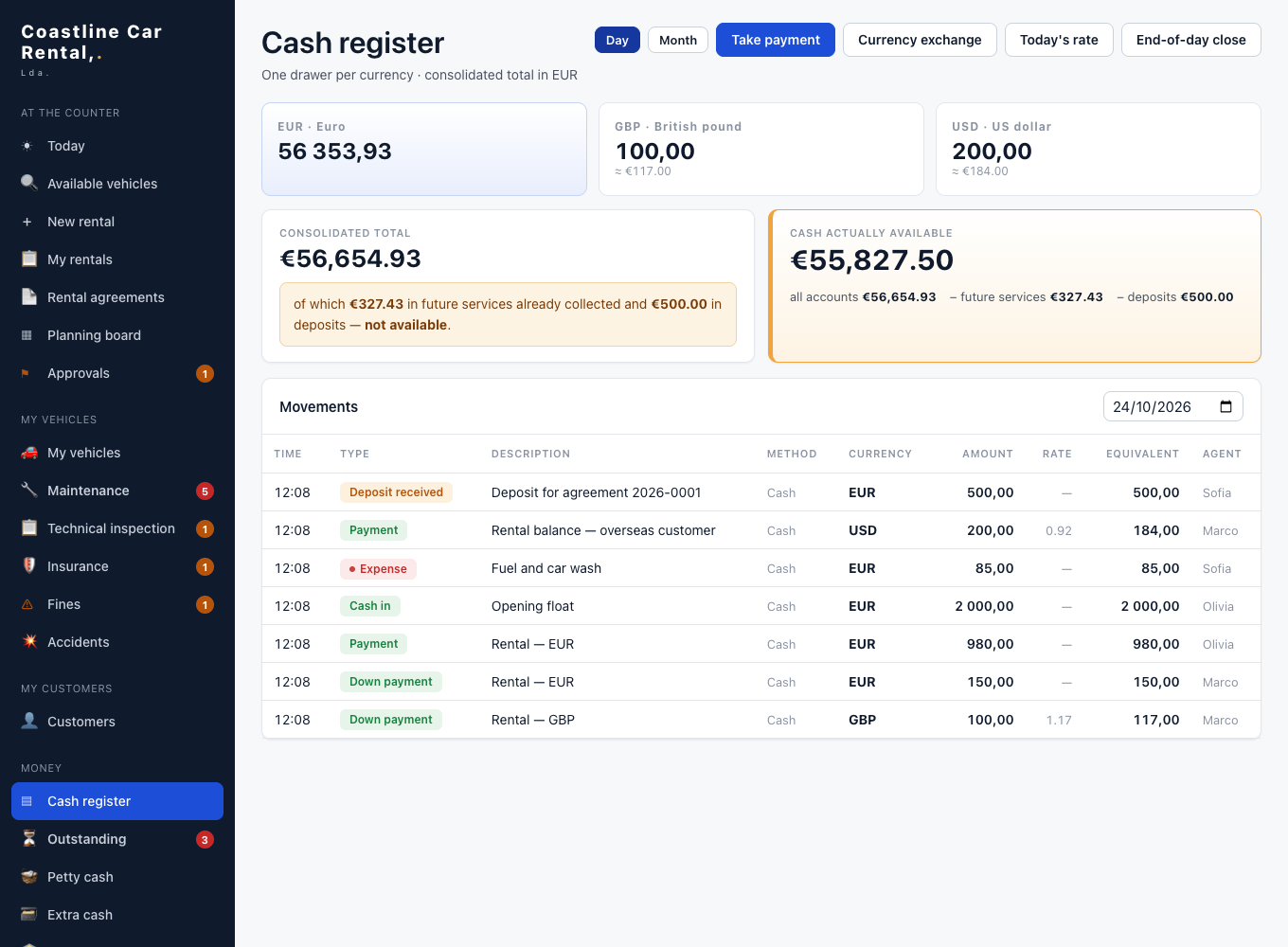
Four pockets: cash drawer, bank, petty cash and extra. Cheques go to the bank pocket automatically. The month view counts money in the month you received it, and flags advance payments in both months so nothing is counted twice. Every evening, the drawer is counted and any gap needs a reason.

Petty cash and expenses screen

Planning board

Twelve months of your fleet on one screen.

Rented, reserved, free or in maintenance — and each booking bar shows whether it's paid, partly paid or unpaid.

Planning board with bookings

Rental agreement & inspection

Paperwork that holds up.

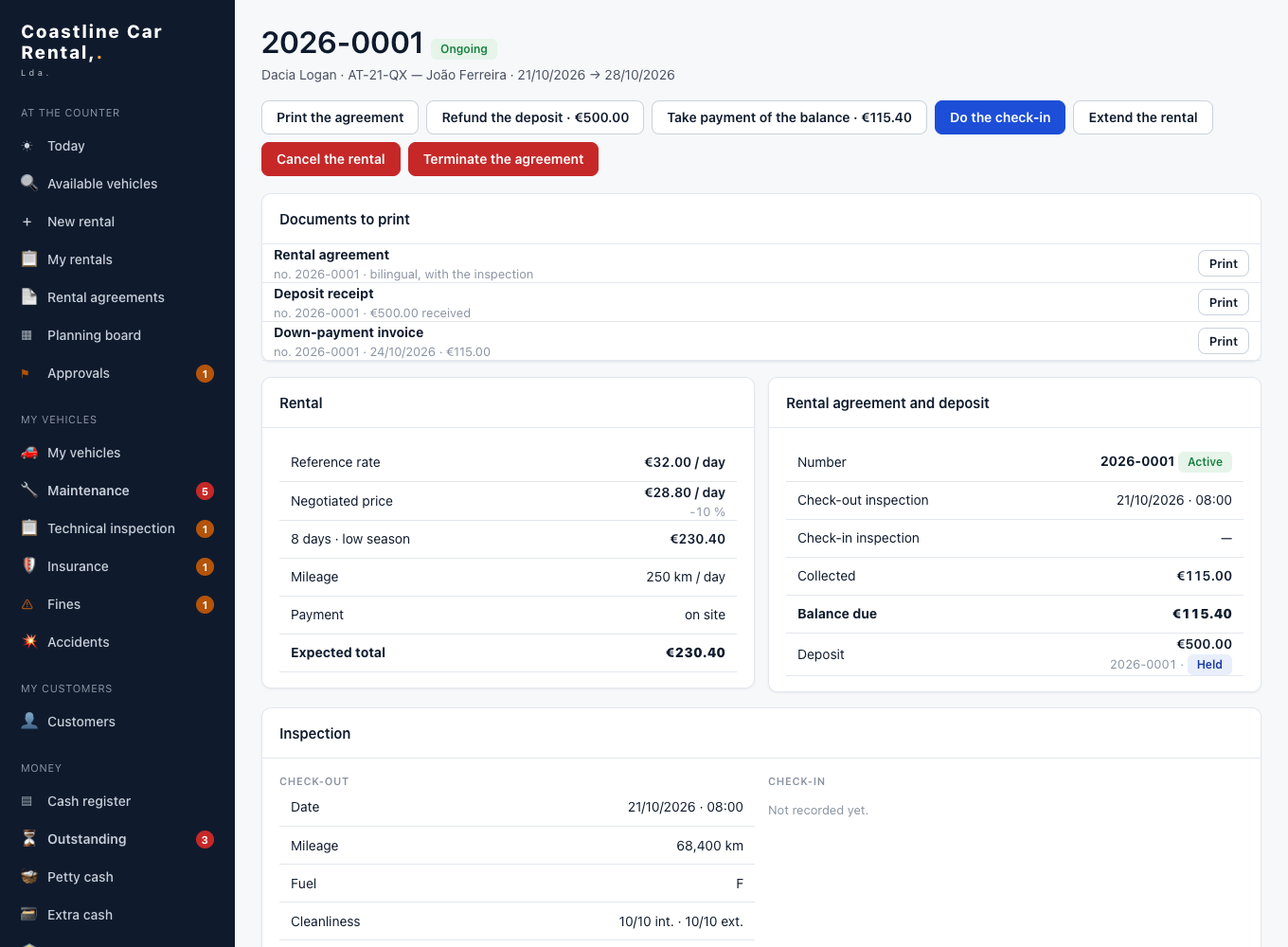
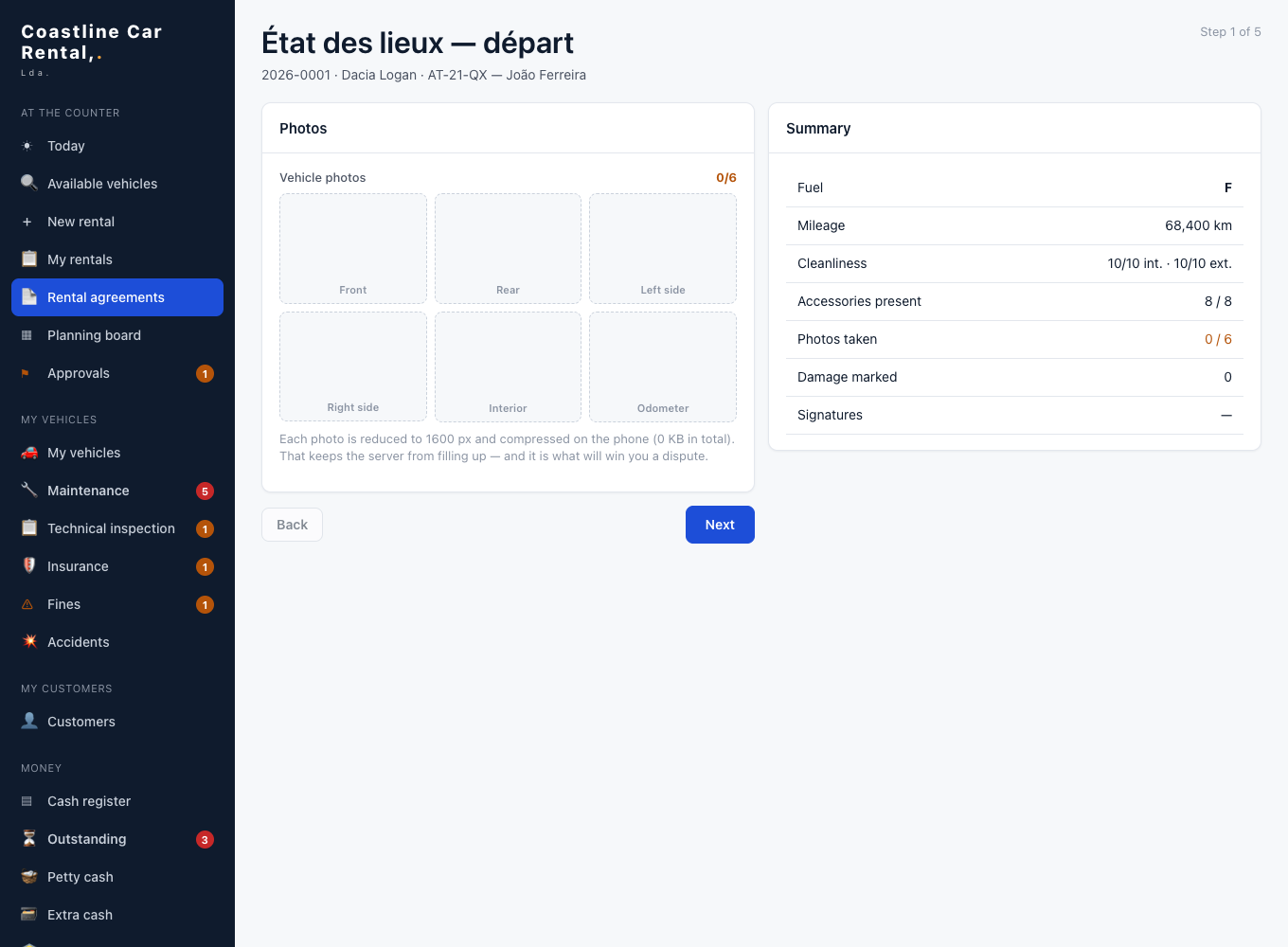
A printed contract (French/Arabic today; more languages as we add them), invoice with VAT if you use it, deposit receipt and damage report, all as PDF. Check-out and check-in on a car diagram with photos. Return charges calculated automatically.

Rental fileCheck-in inspection on a car diagram

Deposits & outstanding

Deposits stay deposits. Debts don't disappear.

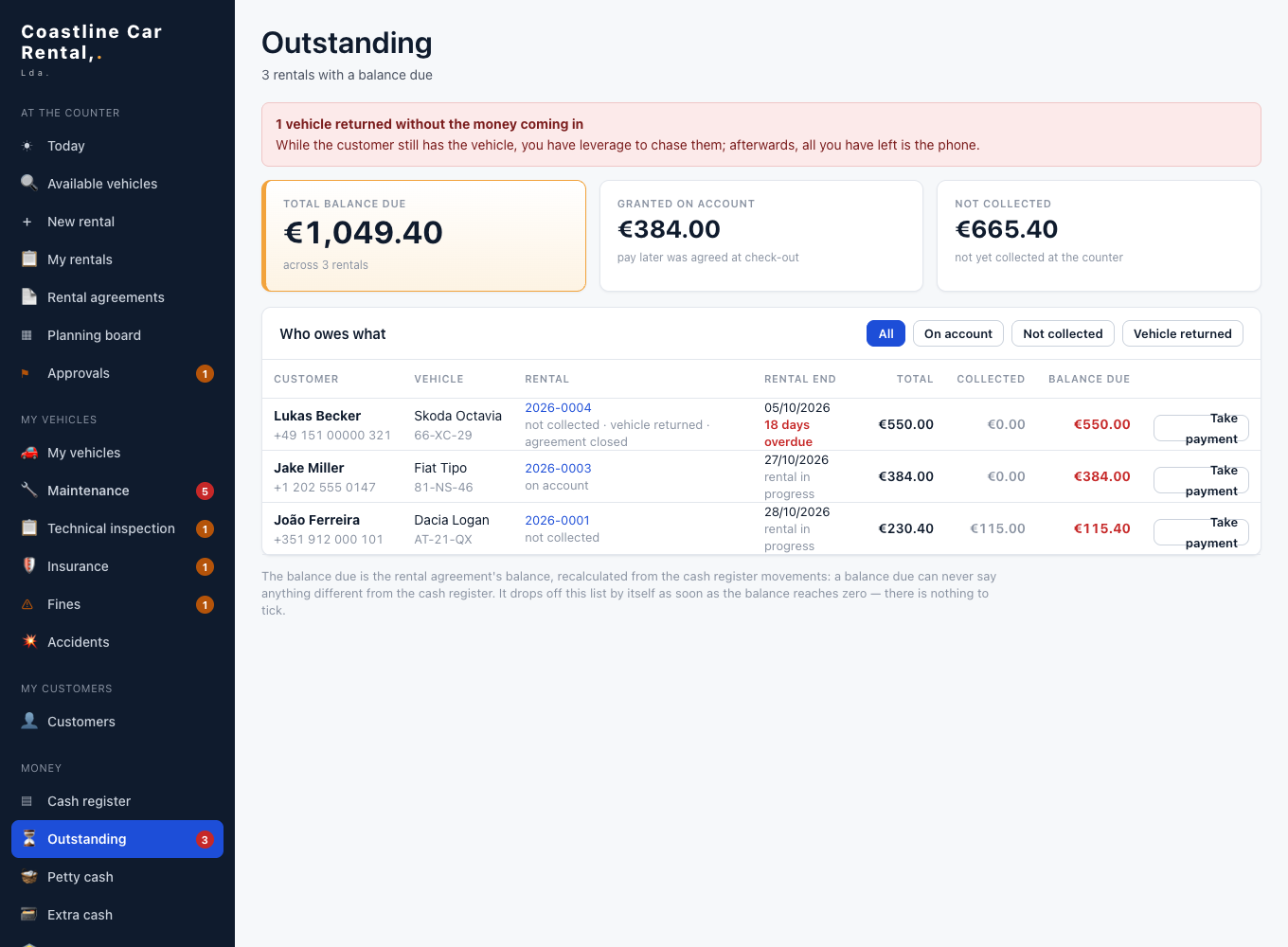
Deposits are taken, receipted and returned apart from revenue, and invoices deduct them correctly. The Outstanding screen separates agreed instalments from payments that were simply forgotten.

Outstanding payments screen

Maintenance & compliance

The car is ready, and legal.

Oil change, brakes and tyres by kilometres or months — you set the intervals. Technical inspection and insurance dates. Fines matched to whoever was driving. Accidents on file. Each car has its own revenue and cost sheet.

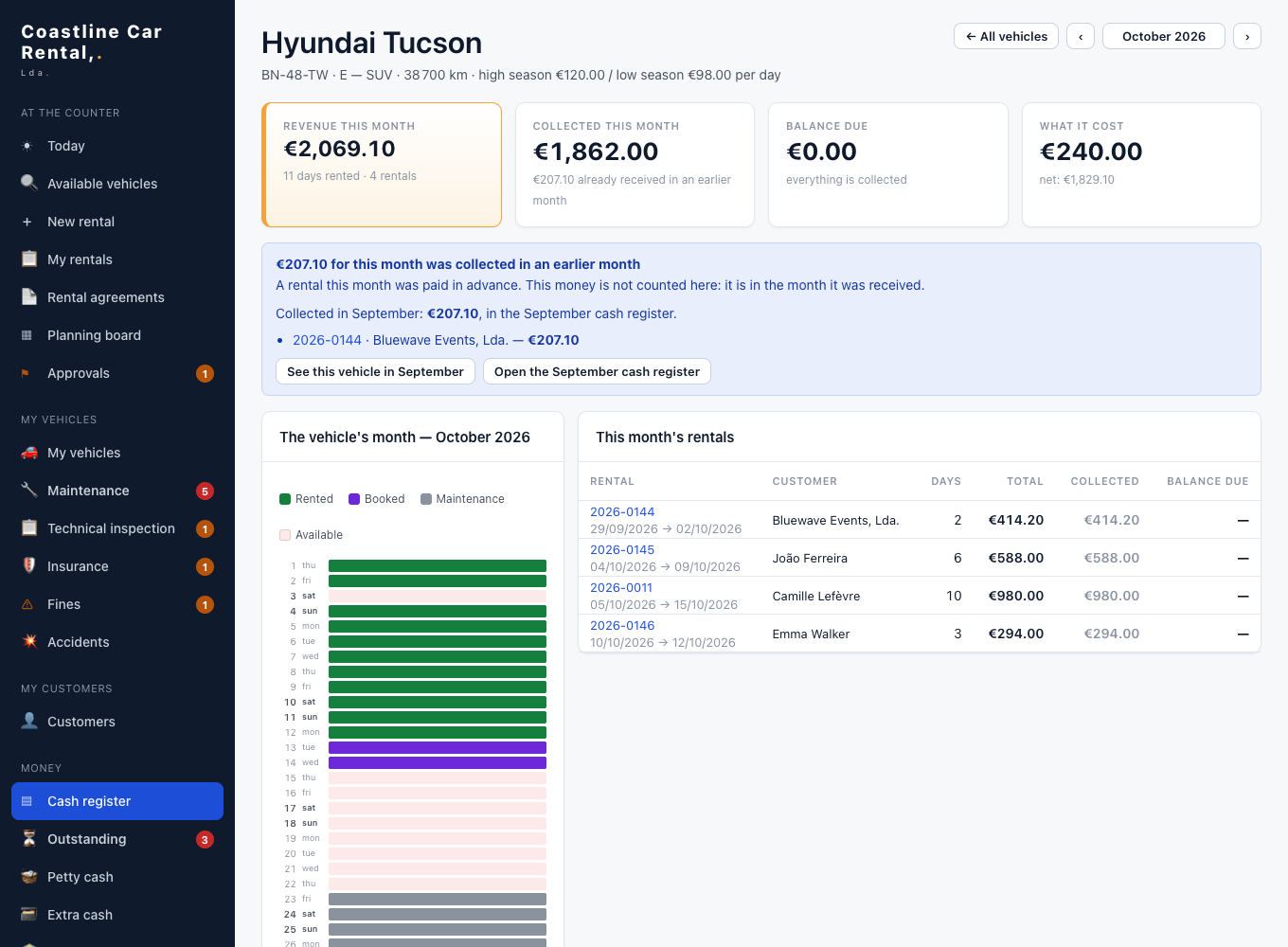
Vehicle revenue and cost sheet

Roles & audit log

Trust your team, and check.

Owner, manager and counter staff each see what they need. Counter staff can't delete or rewrite: they send a correction request and a manager approves it. The audit journal can't be edited.

Multi-currency

Euros, dollars, dinars — in the same drawer.

Each currency is kept apart, with the day's exchange rate. Useful for tourist areas and diaspora customers.

Works offline

No signal at the car park? Keep going.

Install Clefo on any phone from the browser. When the connection drops, your actions wait and send themselves when it's back.

Screens shown come from the demo agency with fictional data.

Built with a real agency

Clefo didn't start as a startup idea. It started at the counter of a car rental agency in Algiers. We built it with the owner and the team, from their real contract, their real prices — summer and winter rates, negotiated deals, monthly rentals — and their real problem: knowing where the money was at the end of each day. It has been in daily use there since October 2026. Now we're making it available to independent agencies in other countries.

We have one reference agency today. We'd rather tell you that than invent ten.

Pricing

Two ways to buy — your choice. Excl. VAT.

A. Buy it once, host it yourself

Self-hosted

€1,900 one-time

  • Perpetual licence for one agency
  • Runs where you want: a PC at your counter, your own server, or any cloud
  • Your data stays with you
  • Optional updates & support: €390 / year
  • Installation help free for our first 10 agencies

B. Subscribe, we host it — monthly or yearly, cancel any time

Starter

€49 / month

€490 / year (2 months free)

  • up to 10 vehicles
  • 1 location
  • 3 users
  • All features, your own private instance, updates, email support.

Pro

€89 / month

€890 / year (2 months free)

  • 11–30 vehicles
  • 2 locations
  • 8 users
  • All features, your own private instance, updates, email support.

Business

€159 / month

€1,590 / year (2 months free)

  • 31–80 vehicles
  • Multi-location
  • Unlimited users
  • All features, your own private instance, updates, email support.
  • Extra vehicle beyond your tier: €2/month.
  • Launch offer for our first 10 agencies: setup free (instance, settings, your contract template, 1 h remote training). After that, setup is €190.
  • Importing your data from Excel or another tool: quoted (typically €150–€400).
  • Also priced in GBP, USD, CAD and AUD — ask us.
  • Payment: EUR bank transfer or stablecoins (USDT/USDC), against an invoice. Payment details are on the invoice.

Questions

Can my customers book online?

Not yet. Bookings are entered by your team at the counter or by phone. An online booking engine is on our roadmap. If online booking is your top priority today, a tool like HQ or Booqable may suit you better — we'd rather say so.

Can I take card payments in Clefo?

Clefo records card payments you take on your own terminal, but it doesn't process cards or pre-authorise deposits. Card payments are on the roadmap.

Where is my data stored? Is it GDPR-compliant?

Each agency gets its own private instance. For European agencies we host in the EU. We sign a data processing agreement with you. We do not claim any certification.

Can I export my data?

Yes. Your data is yours. You can print or save every document as PDF, and on request we give you a full copy of your database.

Who supports me?

The founder, directly, by email, in French or English, during CET working hours.

What if you stop?

We'll give you at least 90 days' notice and a full export of your data. You can also buy Clefo once and host it yourself: it keeps working whatever happens to us.

Is it in English?

French is complete. English is being finished. Contracts print in French/Arabic today; English contracts come with the English version.

Does it work in my country?

Clefo handles multiple currencies and optional VAT today. Country settings (tax name and rate, legal IDs, time zone, km or miles) are being added. Tell us your country and we'll tell you honestly what's ready.

Does it work without internet?

Yes, on phone or computer. Actions taken offline are queued and sent when the connection returns. You need a connection for the first login.

How long does setup take?

We set up your instance, your vehicles and prices, and your contract with you, then train your team remotely for one hour.

Does it replace my accountant?

No. Clefo shows where your money is and what each car earns. Your accountant still does the books. An accounting export is on the roadmap.

Can I try before paying?

Yes. Open the live demo now, no sign-up. If it fits, we can set up a trial instance for 30 days.

Can I run it on my own PC?

Yes, with the one-time purchase. Clefo installs on a Windows or Mac PC at your counter (or your own server or cloud); other PCs and phones in the agency connect over your Wi-Fi. The PC must stay on during opening hours, and access from outside the agency needs a VPN you set up. Backups go to an external drive or a cloud folder.

How do I pay?

By EUR bank transfer, or in stablecoins (USDT/USDC) if you prefer, against an invoice. No card. Payment details are on your invoice.
See your counter the way Clefo sees it.